Cabal UI Skins
26 free Cabal UI skins for Cabal Online. Pick one below, check the real texture preview, then download the zip.
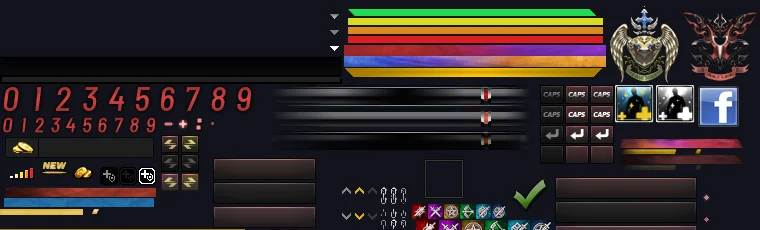
Two builds: EP35–EP36 and EP39 (EP39 has a different Event Pass UI). Pick your client.
After you try it, send your in-game screenshot on Discord to get featured in the previews.
How to install a Cabal UI skin
Back up
Close the game and copy your client's Data\UI folder somewhere safe.
Extract
Unzip the skin over your client folder so Data\UI\Theme1 is overwritten.
Launch
Start the client. To go back, restore your backup.
Standard skins recolor the Drift Prestige look. Premium skins also retint the panels and add patterns or transparency. Each skin has an EP35 to EP36 build and an EP39 build.
Cabal UI skin FAQ
What is a Cabal UI skin?
A Cabal UI skin replaces the interface textures in your client's Data\UI folder, so windows, gauges, numbers and buttons get new colors or a new look. The game itself is not changed.
How do I install a Cabal UI skin?
Back up your Data\UI folder, extract the skin zip over your Cabal Online client folder so Data\UI\Theme1 is overwritten, then start the game. To go back, restore your backup.
Why did my Cabal UI skin go back to the default?
Some game launchers restore official files when they check or update the client. If that happens, close the launcher, copy the skin files again and start the game. Which files get restored depends on your server's launcher.
Which Cabal Online version do the skins work with?
Every skin comes in two builds: one for EP35 to EP36 and one for EP39. EP39 has a different Event Pass window, so pick the download that matches your client.
Are these Cabal UI skins free?
Yes. Every skin on this site is a free download. "Premium" is only a category for the styled skins that change panel colors, patterns or transparency.
Which Cabal UI skin should I pick?
Standard skins recolor the accents of Drift Prestige, so pick the color you like. Premium skins also retint the panels: Carbon Red, Frost Glass, Matrix, Royal Gold, Sakura and Bronze.
All Cabal UI skins
- Drift Prestige Cabal UI skin
- Azure Cabal UI skin
- Emerald Cabal UI skin
- Gold Cabal UI skin
- Violet Cabal UI skin
- Magenta Cabal UI skin
- Rose Cabal UI skin
- Crimson Cabal UI skin
- Copper Cabal UI skin
- Amber Cabal UI skin
- Lime Cabal UI skin
- Toxic Cabal UI skin
- Mint Cabal UI skin
- Teal Cabal UI skin
- Cyan Cabal UI skin
- Ice Cabal UI skin
- Indigo Cabal UI skin
- Midnight Cabal UI skin
- Silver Cabal UI skin
- Obsidian Cabal UI skin
- Carbon Red Cabal UI skin
- Frost Glass Cabal UI skin
- Matrix Cabal UI skin
- Royal Gold Cabal UI skin
- Sakura Cabal UI skin
- Bronze Cabal UI skin